
Digital Productivity, Online planners, Planners
2027 Month to View Diary: Complete Buying Guide
Mar
Okay so I’ve been testing month-to-view diaries for literally three weeks now because 2027 is coming faster than I want to admit and my current system is kind of falling apart. Here’s what I actually found works.
The Paper Quality Thing Everyone Gets Wrong
So first thing – and I cannot stress this enough – the paper weight matters way more than anyone tells you. I had this gorgeous looking diary from Paperchase last year, looked incredible in the shop, got it home and the ink from my Pilot G2 bled through immediately. Like I’m talking you could see three months of appointments ghosting through the pages which made planning anything impossible.
You want minimum 80gsm paper, but honestly 100gsm is where it’s at if you use gel pens or markers at all. I tested this accidentally when my dog knocked over my coffee mug onto the Blue Sky diary I was reviewing and the pages held up surprisingly well? Like yeah it was wet but nothing bled through to the next month which was genuinely impressive.
The brands that consistently nail the paper quality:
- Leuchtturm1917 – their 2027 range has 100gsm throughout
- Moleskine Professional (not the classic ones, those are too thin)
- Paperblanks if you can deal with their busy covers
- Quo Vadim which nobody talks about but should
Size Is Gonna Make or Break This
I keep telling my coaching clients this but they never listen until they’re stuck with a diary that doesn’t fit their bag. A month-to-view needs space to actually write stuff but also needs to be portable enough that you’ll use it.
A5 is the sweet spot for most people. It’s roughly 5.8 x 8.3 inches which sounds small but when you lay out a month across two pages you get decent writing space for each day. I can fit about three appointments per day comfortably in my A5 Leuchtturm.
A4 month-to-view feels luxurious but here’s the thing – it lives on your desk. Which is fine if you’re home-based like me but my clients who commute or work in offices? It stays at home and then they forget to check it. Defeated the whole purpose.
Personal size (roughly 3.7 x 6.7 inches) works if you literally just need to see what day things are on. You’re not writing detailed notes. My friend Sarah uses one and just puts dots for busy days then checks her phone calendar for details which… seems like extra steps to me but whatever works.
The Layout Configurations Nobody Explains Properly
So month-to-view sounds straightforward but there’s actually like five different layout styles and they work totally differently depending on how your brain processes information.
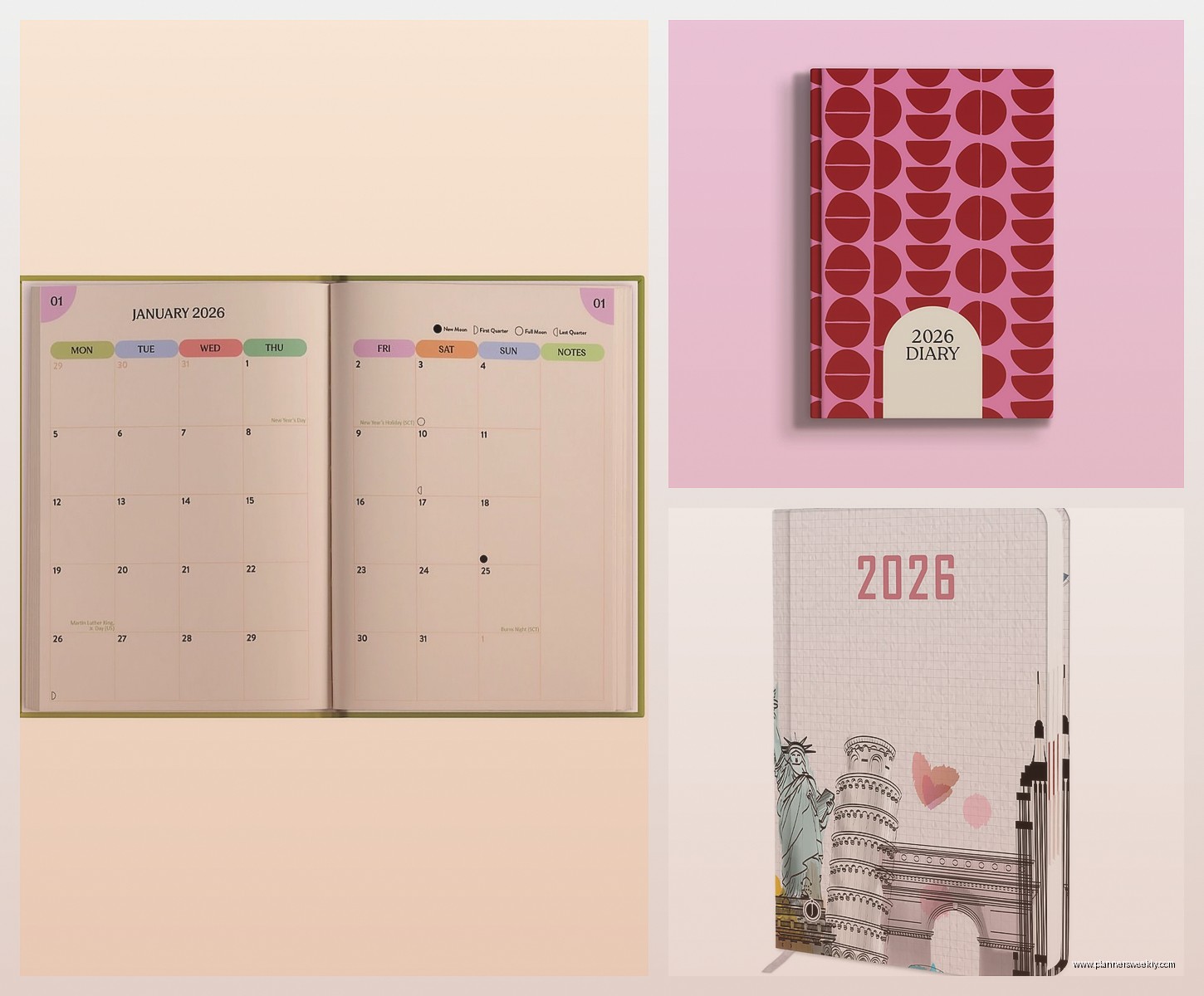
Standard grid layout is what most people picture – seven columns, four or five rows, each day gets a box. This is what I use because I like seeing the week structure clearly. Good for people who think in weeks rather than just dates.
Vertical columns where each day runs down the page instead of across – honestly I found this disorienting? But my sister loves it because she says it matches how she scrolls her phone calendar. The 2027 Quo Vadim Timer has this layout and the quality is solid if this is your thing.
Oh and another thing – some brands do Sunday-start vs Monday-start and you really gotta check this before buying. I’m a Monday-start person, always have been, and I accidentally bought a Sunday-start Blue Sky diary in 2025 and spent six months writing in the wrong boxes. Felt like an idiot.
The Binding Situation That Nobody Thinks About Until It’s Too Late
This is gonna sound weird but the binding type affects whether you’ll actually use the diary long-term. I’ve noticed this pattern with my clients too – certain bindings just work better for certain use cases.
Sewn hardcover binding like Leuchtturm or Moleskine means the diary lays flat when you open it. Sounds minor but when you’re trying to reference February while planning April, having both pages visible without holding the diary open is actually huge. These last the full year without pages falling out too.
Spiral binding is controversial. Some people swear by it because you can fold it back completely. I personally find the spiral catches on everything in my bag and by month eight it’s all bent out of shape. But if you’re keeping it on a desk only? Actually pretty convenient. The AT-A-GLANCE 2027 range does nice spiral bounds.
Perfect binding (that’s the glued spine you see on paperbacks) is the cheapest option and honestly it’s fine for the first six months then pages start coming loose. If you’re the type who only really uses a diary for the first half of the year anyway – no judgment, lots of people are – then this saves money.
What Actually Needs to Be on Each Page
I tested like fifteen different 2027 diaries and the amount of extra information printed on the pages varies wildly. Some of this stuff is useful, most of it just clutters the space.
Week numbers – okay I thought these were pointless until I had a client who works in project management and apparently entire industries run on week numbers? Week 32 this, Week 47 that. If you work in tech, manufacturing, or corporate project stuff, make sure your 2027 diary has week numbers. Leuchtturm and Filofax both include them.
Moon phases show up on some of the more expensive diaries and look… I’m not saying I plan my life around moon phases but I did notice I was scheduling difficult conversations during full moons and maybe that wasn’t helping anything. Paperblanks includes these and they’re surprisingly useful for gardening planning too if you’re into that.
Public holidays are essential and you’d think every diary would include them but nope. Check whether the diary includes holidays for your specific country. I bought a beautiful diary once that had US holidays but I’m in the UK so it was useless for planning around bank holidays.
Wait I forgot to mention – some month-to-view diaries have notes sections at the back and some don’t. The Moleskine Professional has like 50 pages of notes which I thought would be excessive but I actually use them constantly for brain dumps and meeting notes. The basic Moleskine classic has maybe 10 pages which runs out by March.
Color Coding and Customization Options
Right so if you’re someone who color codes everything (hi, it’s me, I color code my spice rack) then you need space in the daily boxes to actually do that. Some diaries cram the date numbers so large that there’s barely room to write let alone use highlighters.
The Erin Condren 2027 month-to-view has intentionally small date numbers specifically for color coding. Each day box is big enough to use three different colored pens comfortably. I use blue for work commitments, green for personal stuff, red for deadlines. Sounds complicated but becomes automatic fast.
Stickers are a whole thing in the planning community and okay I’m not really a sticker person BUT if you are, you need diary boxes that are at least 1.5cm square otherwise stickers overlap everything. The Happy Planner does large boxes specifically designed for sticker planning.
Oh and funny story – I was testing the Rifle Paper Co. 2027 diary while watching The Last of Us (procrastinating, whatever) and realized their decorative borders on each month page actually make it harder to see your plans at a glance. Like they’re beautiful, very aesthetic, but functionally annoying if you need to quickly scan what’s happening on the 23rd.
The Digital Hybrid Approach That’s Actually Working
Okay so this wasn’t supposed to be part of this guide but I keep recommending this to clients and it’s too useful not to mention. Some 2027 month-to-view diaries now come with companion apps or digital integration.
The Clever Fox diary has a scanning feature where you can photograph your monthly spread and it digitizes it. I was skeptical but tested it for two months and it’s actually decent for backup purposes. Not perfect – my handwriting is terrible so some words get misread – but for remembering what you planned it works.
Moleskine has those smart writing system compatible versions where you use their special pen and it records everything digitally as you write. Expensive though. Like significantly more expensive. Unless you need digital copies of everything for work I’d skip this.
Most people honestly just need a regular paper month-to-view and their phone calendar synced. I use paper for big picture planning and monthly overviews, phone for specific appointment times and reminders. Trying to do everything in one system never works for anyone I’ve coached.
Price Points and What You Actually Get
So here’s the budget breakdown from my testing because prices for 2027 diaries are all over the place.
Under $15 – You’re looking at basic functional diaries. Paperchase, WHSmith own brand, basic AT-A-GLANCE. Paper quality is usually 70gsm so expect some ghosting. Bindings are mostly perfect bound so might not last the year. But honestly? If you’re new to month-to-view planning or not sure you’ll stick with it, start here. The 2027 Blue Sky Academic year diary is like $12 and totally serviceable.
$15-30 – This is where quality jumps significantly. Moleskine classic, Leuchtturm1917, Quo Vadim, better Blue Sky options. Paper is 80-100gsm, sewn bindings, will last the full year. This is my recommended range for most people. The Leuchtturm1917 2027 Monthly Planner is about $25 and it’s what I personally use.
$30-50 – Premium brands with extra features. Erin Condren, Rifle Paper Co., fancy Moleskine Professional editions, Paperblanks. You’re paying for design, thicker paper, extras like pockets and elastic closures. Worth it if you use your diary constantly and want something that feels nice to handle. The Erin Condren 2027 Monthly Planner is around $35.
Over $50 – Leather bound, luxury brands, or smart pen compatible systems. Unless you’re really into stationery as a hobby or need it for professional appearances, probably overkill for most people. That said the Filofax leather month-to-view inserts with the leather binder are gorgeous if you’ve got the budget.
Specific Recommendations Based on Actual Use Cases
Because just listing diary features is useless without context right? Here’s what I recommend based on how different people actually work.
If you’re a student or academic: Blue Sky 2027 Academic Year Monthly Planner. Runs August to July which matches academic calendars, cheap enough that you won’t cry if you lose it, decent paper quality. The weekly view version is better for tracking assignments but the monthly is fine for overview planning.
If you’re self-employed or freelance: Leuchtturm1917 Monthly Planner in A5. The notes pages at the back are perfect for client notes and project tracking. I use mine to sketch out content calendars for blog planning. Lays flat which matters when you’re referring to it while typing. Week numbers help when clients say stuff like “can we schedule that for week 34.”
If you work in corporate and just need appointment tracking: Moleskine Professional Monthly. Looks professional enough for meetings, not too expensive, comes in black which matches everything. Has a notes section for meeting minutes. The elastic closure means it stays shut in your bag.
If you’re planning for a family or household: Bigger format works better here. The AT-A-GLANCE 2027 Monthly Wall Calendar isn’t technically a diary but functions like one and everyone can see it. For portable option the Blue Sky Large Monthly has bigger day boxes for tracking multiple people’s schedules.
If you’re really into aesthetic planning: Rifle Paper Co. or Paperblanks. Be aware you’re prioritizing design over function but that’s a valid choice if it makes you more likely to use the diary. The Rifle Paper Co. 2027 Garden Party Monthly is genuinely beautiful. I keep almost buying it even though I know the Leuchtturm works better for me functionally.
If you’re testing month-to-view for the first time: Start cheap. The Paperchase own-brand 2027 month-to-view is under $10 and fine for figuring out if this planning style even works for you. So many people buy expensive planning systems then never use them. Test first.
The Features That Sound Good But Actually Aren’t
Through testing and watching my coaching clients I’ve noticed certain diary features that seem useful but end up being annoying.
Elastic closure bands – everyone thinks they want this then complains the elastic wears out by month six and becomes loose and floppy. Unless you’re throwing the diary in bags with lots of other stuff you don’t really need it. Pages don’t just fall open randomly.
Ribbon bookmarks – okay multiple ribbons sound fancy but I only ever use one and the others just dangle around getting in the way. One ribbon is plenty for marking current month.
Perforated pages – some monthly diaries have perforated corners so you can tear them out once the month is done. In theory this keeps the diary slim. In practice I’ve never met anyone who actually tears the pages out because what if you need to reference something?
Back pocket folders – cute idea, I never use them. Everything I shove in there falls out within days. If you need to store loose papers get a separate folder.
Habit trackers in a month-to-view format don’t have enough space per day to actually track anything meaningful. You need a weekly or daily spread for proper habit tracking. The month-to-view diaries that try to include habit trackers just end up cluttered.
