
Digital Productivity, Online planners, Planners
Day Designer Daily Planner: Complete System Review
Mar
Okay so I’ve been using the Day Designer daily planner for like six months now and honestly? I have THOUGHTS. My client canceled yesterday so I literally spent two hours comparing my current one to the older version I had and taking notes because someone in my productivity group asked about it.
The Actual Layout That Everyone Asks About
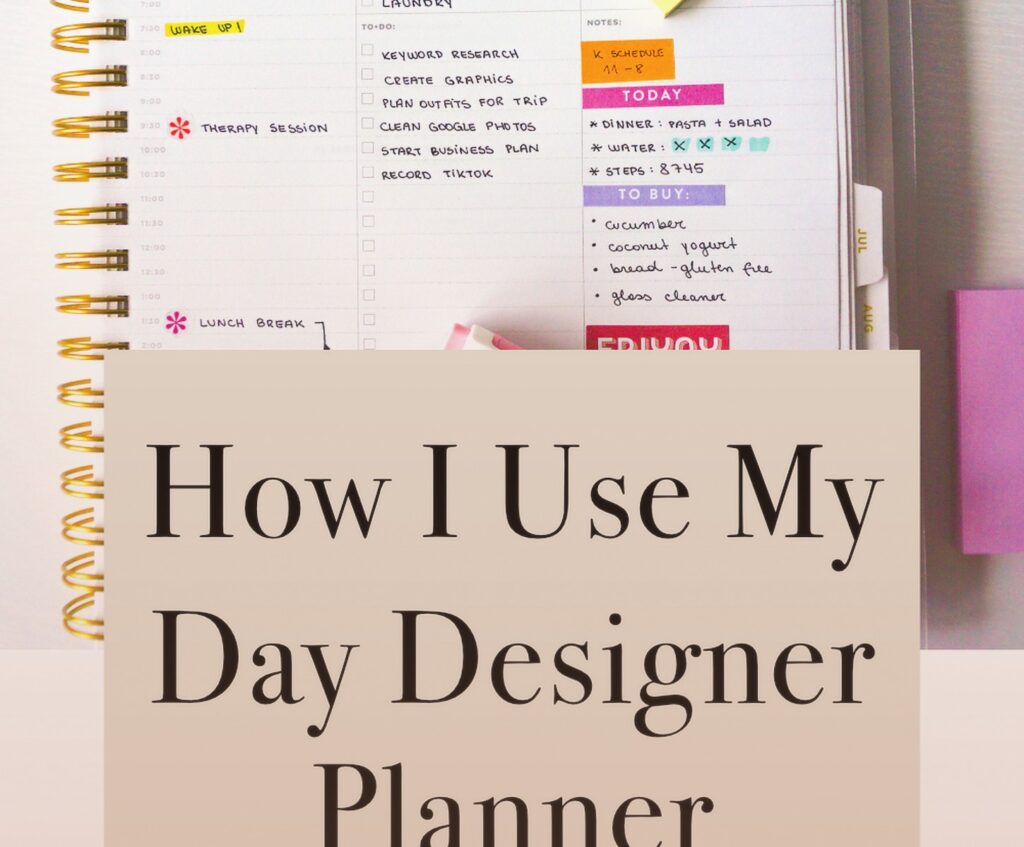
The daily spread is what makes this thing different from every other planner. You get a full page per day, which sounds excessive until you actually use it. Left side has your hourly schedule from 6am to 9pm, and the right side is split into sections for to-dos and notes. The hourly blocks are 30-minute increments which is… fine? I wish they were bigger because my handwriting is terrible but it works.
What I really like is the top section where you put your daily targets. It’s just three lines but it forces you to actually think about what matters that day instead of just writing down every random task. My cat knocked over my coffee while I was filling this out this morning and thank god the paper is thick enough that it didn’t bleed through to tomorrow’s page.
The Monthly Section Nobody Talks About
Before each month starts you get this two-page monthly calendar spread. Standard stuff. But here’s what’s actually useful – there’s a notes section on the right page that I use for tracking bigger projects or monthly goals. I started using it to track which clients I need to follow up with and it’s been way more helpful than I expected.
They also include these little monthly reflection pages at the end with prompts like “what went well” and “what to improve” which I ignored for the first three months because they felt cheesy. But then I actually tried filling them out and oh man, it’s so helpful for seeing patterns in your productivity. Like I realized I was overcommitting every single Tuesday because that’s when I have the most energy and think I can do everything.
Paper Quality Because This Actually Matters
The paper is 80lb text weight which means it can handle most pens without ghosting. I tested it with my usual rotation – Pilot G2, Muji gel pens, Stabilo fineliners, and even a fountain pen because why not. The gel pens and fineliners are perfect. The fountain pen bled through a tiny bit but honestly who’s using a fountain pen in a daily planner anyway.
One thing that bugs me though is the paper is cream colored, not white. Some people love this but I find it harder to read my notes at night under my desk lamp. Not a dealbreaker but worth knowing if you’re picky about that stuff.
Binding Situation
It comes in three formats and this is where people get confused. There’s the coiled version, the hardcover sewn binding, and the softcover sewn binding. I’ve used both the coiled and the hardcover.
The coiled is honestly the most practical if you’re actually using this thing daily. Lays completely flat, you can fold it back on itself, super easy to write in. But it looks less professional if you’re pulling it out in meetings. I had a coaching client once who said she felt weird using a coiled planner with her executive team and I was like yeah, fair.
The hardcover looks gorgeous and feels substantial but it’s HEAVY. Like I stopped carrying it in my bag after a week because my shoulder was hurting. Also it doesn’t lay flat as nicely which is annoying when you’re trying to write on the left page.
Wait I Forgot To Mention The Size Options
They make this in two sizes – the original larger size and a mini version. The original is 8.5 x 11 which is massive. Like bigger than most planners you’ve probably used. The mini is 6 x 8 I think?
I use the original because I need space for all my notes and task lists, but I tested the mini for a month when I was traveling a lot. The mini is cute and way more portable but the daily pages feel cramped. The hourly schedule is tiny and I couldn’t fit all my tasks in the to-do section. If you have a simpler schedule or smaller handwriting it might work but I ended up going back to the full size.
The Extras That Come With It
You get stickers. Like a whole sheet of functional stickers for marking important dates or tasks. I thought these were gonna be useless but I actually use the little star stickers to mark priority items and the arrow stickers to indicate tasks that moved to the next day.
There’s also these bookmark ribbons – two of them in the hardcover version. I keep one on today’s page and one on the current month view. Simple but actually helpful when you’re flipping through quickly.
Oh and another thing – there’s perforated corners on each daily page so you can tear them off as you go and always have the current day easy to find. I never tear mine off because I like keeping everything intact but my sister does this religiously and swears by it.
How I Actually Use This Thing Daily
Okay so here’s my real system. Sunday night I sit down with the planner and look at the week ahead. I fill in my scheduled appointments and meetings first in the hourly section. Then I go through my project list and figure out what needs to happen each day.
Morning of, I fill in my top three priorities at the top. This has to happen in the morning because if I do it the night before I’m always wrong about what actually matters. Then throughout the day I’m adding tasks to the to-do section and crossing them off. Very satisfying.
The notes section on the right is where I dump everything else – random ideas, things people tell me in meetings, notes from calls. It’s not organized at all but at least it’s all in one place. Every Friday I review the week and transfer anything important to my digital systems.
This is gonna sound weird but I also use the margins for doodling when I’m on boring calls. There’s something about having paper in front of me that makes me focus better even if I’m not writing anything productive.
What Doesn’t Work For Everyone
If you have a super simple schedule this is overkill. Like if you only have 2-3 appointments per day and a short task list, you don’t need a full page per day. You’d be better off with a weekly spread planner.
Also if you’re someone who plans everything digitally and just wants paper for backup, this is too much. The whole system is designed for paper-first planning. I have clients who use Google Calendar for scheduling and just want a planner for tasks and notes – I always steer them toward something else.
The daily format also means you can’t see your whole week at a glance which drives some people crazy. I’m used to it now but the first month I kept forgetting about Friday appointments because I wasn’t looking ahead enough.
The Different Year Options Available
Day Designer does academic year planners and calendar year planners. The academic year runs July to June which is perfect if you work in education or just prefer that cycle. Calendar year is January to December obviously.
I use academic year because I like starting fresh in summer when things are slower, but that’s totally personal preference. They also make an 18-month version that starts in July and runs through December of the next year if you want extra time.
One annoying thing – you have to buy a whole new planner each year. There’s no refill system like some other planner brands have. So every year you’re spending $40-60 depending on which version you get and where you buy it.
Where To Actually Buy This
You can get it on Amazon, Target has them, and obviously the Day Designer website. I usually wait for Target to put them on sale in late summer when they’re clearing out the previous year’s designs. Got my current one for like $25 which felt reasonable.
The website has the most color and design options though. They do special editions throughout the year with different cover patterns. I have the navy floral one right now and it’s held up really well – no corner damage or anything after six months of daily use.
Comparing It To Other Daily Planners Real Quick
Someone’s gonna ask how this compares to the Passion Planner or Full Focus Planner so lemme just address that now. Passion Planner has more goal-setting stuff built in and weekly roadmap pages. It’s better if you want more structure around your bigger goals. Full Focus is more productivity-system focused with the whole quarterly planning thing.
Day Designer is simpler and more straightforward. It’s just a really good daily planner without trying to be a whole life coaching system. I actually prefer that because I have my own productivity system and don’t need a planner telling me how to set goals.
Oh wait I should mention the Ink+Volt planner too since that’s the other one people always compare. Ink+Volt has more reflection prompts and gratitude stuff. Day Designer is more functional and less… aspirational? If that makes sense. Less about mindset and more about just getting stuff done.
The Digital Versus Paper Thing
Look I know everyone’s gonna say “why not just use your phone” and honestly sometimes I wonder that too. I have tried going all-digital like five times and it never sticks for me. Something about writing things down makes them more real in my brain.
That said I do use digital tools alongside this. My calendar lives in Google Calendar and syncs to my phone. The planner is where I do my daily planning and task management. They work together. I’m not one of those paper-only people who acts like technology is evil.
Who This Actually Works Best For
If you have a lot of appointments and meetings, this is great. The hourly layout makes it easy to see your day at a glance. I use it for my coaching practice where I have client calls throughout the day plus admin time blocked out.
Also good for people who have both scheduled stuff and project work. The split layout handles both. If your job is just one or the other you might not need this specific setup.
And honestly? If you just like having a nice planner and writing things down, it’s gonna work fine. Sometimes the best planner is just the one you’ll actually use, you know? This one is pretty enough that I enjoy opening it but functional enough that it’s not just decorative.
People it doesn’t work for – anyone who needs to see multiple weeks at once for planning purposes, people with really simple schedules, anyone who’s gonna be annoyed by how big it is. Also if you travel constantly the size is rough unless you get the mini.
Random Tips I’ve Learned
Use the monthly calendar to block out vacation days and big deadlines first thing. Makes it way easier to plan your daily pages when you know what’s coming.
Don’t stress about filling every section every day. Some days I barely use the notes section and that’s fine. It’s there when you need it.
If you mess up a day page just put a sticky note over it or cross it out and move on. I used to try to keep everything perfect and it made me not want to use it.
The planner works better when you review it regularly. I do a weekly review every Friday afternoon and a monthly review at the end of each month. Just flipping through and seeing what I actually accomplished versus what I planned.
Buy good pens. Seriously the planner is nice enough that using a crappy pen feels wrong. Doesn’t have to be expensive but get something that writes smoothly.
Anyway that’s basically everything I know about this planner after using it for months. It’s not perfect but it’s really solid if you want a straightforward daily planning system that looks professional and has enough space to actually be useful.


