
Digital Productivity, Online planners, Planners
Day Designer Planner System: Complete User Guide 2026
Mar
Okay so I’ve been using the Day Designer planner for like three years now and honestly it’s one of those systems that either clicks immediately or you’re gonna fight with it for months before you figure out if it works for you.
The Basic Layout Thing Everyone Gets Wrong
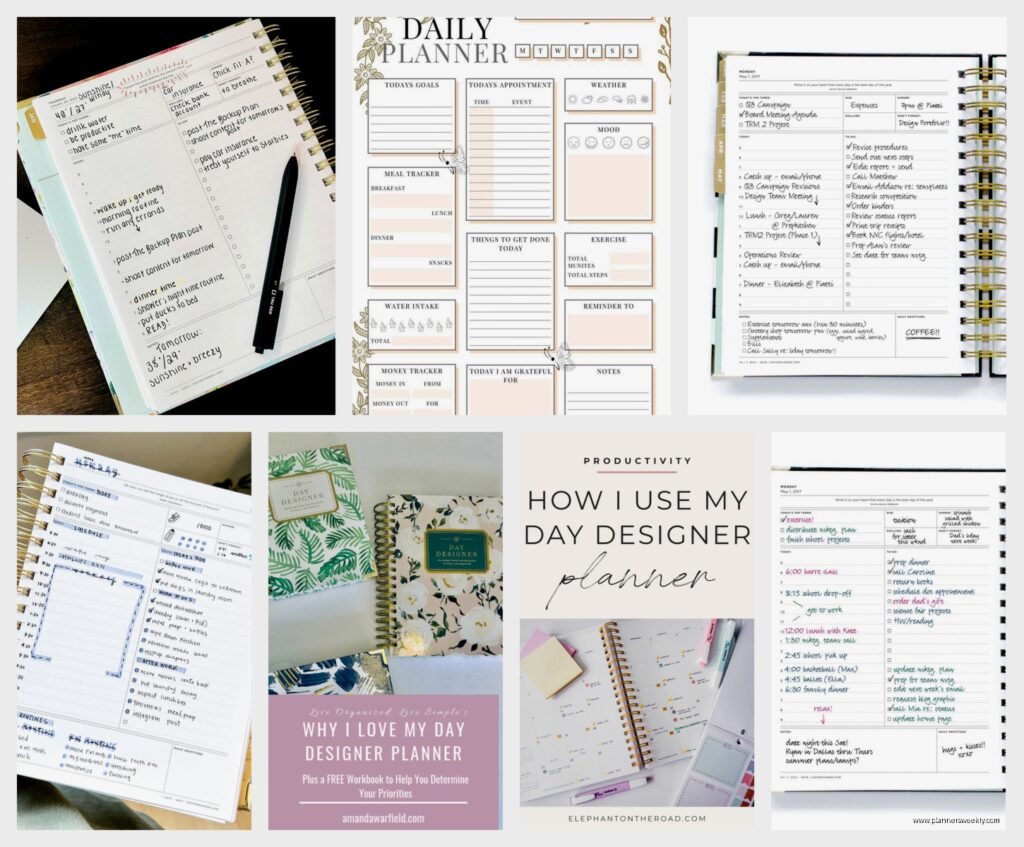
Right so the Day Designer isn’t just a planner, it’s actually a whole methodology and that’s where people mess up. They buy it thinking it’s like any other daily planner but then get overwhelmed because there’s SO much space on each page. Like, an unreasonable amount of white space that makes you feel like you should be accomplishing way more than you actually are.
The main page layout has this top section for your daily targets – which they call the “top 3” but honestly I usually only manage 2 on a good day – and then there’s the hourly schedule from 5am to 9pm. Who is waking up at 5am to plan things, I don’t know, but it’s there. Below that is a notes section and a gratitude/dinner plan spot that I literally never use for gratitude because I’m not that person.
Time Blocking Is Actually The Whole Point
Here’s what took me forever to figure out: the Day Designer works best when you time block everything. And I mean EVERYTHING. My cat knocked over my coffee the first week I was trying to learn this system and I just… gave up that day and went back to my old bullet journal. But once you commit to blocking out even the small stuff – like “answer emails 9-9:30” or “lunch break 12-1” – it actually starts making sense.
You’re not supposed to write tasks in the hourly slots. You’re scheduling when you’ll DO the tasks. That’s the difference. Your top 3 are WHAT you need to do, the hourly column is WHEN you’ll do them. Took me probably six weeks to stop mixing those up.
Which Version You Should Actually Buy
Okay so they have like five different versions now and it’s annoying. There’s the flagship Daily Planner which is the big one everyone thinks of, then there’s a Weekly version, a Mini Daily, and some academic year options.
If you’re buying your first one, get the Daily Planner in the regular size, not mini. I know the mini is cute and seems more portable but you will run out of space so fast. The regular size is 8.5 x 11 which sounds huge but it needs to be that big for the system to work. I tried the mini for a month last year when I was traveling a lot and it was just… frustrating. Couldn’t fit everything and then I was using sticky notes which defeated the whole purpose.

The Weekly version is for people who don’t actually need daily planning or who are combining it with a digital system. Like if you use Google Calendar for all your appointments but want something physical for goals and weekly overview. I have a client who uses that and loves it but she’s also way more minimalist than me.
Coil Bound vs Sewn Binding
This is gonna sound weird but this matters way more than you’d think. The coil bound ones lay flat which is amazing for actually writing in them, but the coil gets bent if you throw it in a bag. The sewn binding looks prettier and more professional but doesn’t lay completely flat and you gotta hold it open or break the spine (which hurts my soul a little).
I’ve used both and honestly I keep going back to coil bound even though I’ve destroyed like three coils by being careless. The ability to fold it completely back on itself when I’m writing in a coffee shop or whatever is worth it.
How To Actually Set It Up Without Losing Your Mind
First week of using a Day Designer is weird because you’re gonna over-plan everything. You’ll block out every single minute and then feel like a failure when you don’t follow it exactly. Don’t do that to yourself.
Start by blocking out only the non-negotiable stuff: work hours, meetings, appointments, meal times if you have a specific schedule. Leave gaps. Like actual empty gaps. Those are gonna fill up with the random stuff that always happens – someone stops by your desk, you need to make a phone call you forgot about, whatever.
Oh and another thing – the Top 3 section should include at least one thing that’s not work related. Otherwise you’ll burn out in like two weeks. I learned this the hard way after a month of only putting work tasks and then realizing I hadn’t gone to the gym once or called my sister back in three weeks. Now I usually do 2 work tasks and 1 personal thing.
The Monthly Spreads Are Actually Useful
At the front of each month there’s a monthly calendar and a goals page. I used to skip right past these because I’m impatient and just wanted to get to the daily pages, but they’re actually super helpful for the overview stuff.
I use the monthly calendar for deadlines and bigger events, then I can reference it when I’m doing my weekly planning on Sundays. The goals page I break into categories: work projects, personal stuff, health things, and then this random category I call “life admin” which is like… renew your car registration, schedule dentist appointment, that kind of boring adulting stuff that always falls through the cracks.
Integrating It With Digital Tools
Okay so funny story, I tried to go completely analog with this system for like six months and it was a disaster. Missed so many appointments because I forgot to check my planner before agreeing to meetings on Zoom. You gotta have a hybrid system unless your job is super analog-friendly.
What works for me: Google Calendar has all my appointments and meetings, Day Designer has my daily task execution plan. Every Sunday night I spend maybe 30 minutes looking at my Google Calendar for the week ahead and blocking out those committed times in my Day Designer first. Then I can see what actual working time I have left and plan my projects around that.

Some people do it the other way – plan in Day Designer first then transfer to digital – but that’s double work and I’m too lazy for that.
The Notes Section Is For Brain Dumps
That notes area at the bottom of each page? I used to try to make it neat and organized but that’s not what it’s for. It’s for when you’re in the middle of something and remember three other things you need to do. Just dump them there and then migrate them to the appropriate day later.
My notes sections are honestly a mess most days – random phone numbers, ideas for blog posts, reminders to order dog food, whatever. Then on Friday afternoons I go through the week and pull out anything important that needs to move forward.
Common Problems And How To Fix Them
Problem one: You keep not using it. This happens when you bought it because it’s pretty but the system doesn’t match your actual workflow. If you’re not naturally a time-blocker, this planner will annoy you. It’s okay to admit it’s not for you and try something else.
Problem two: You’re running out of space every day. Either you’re over-planning (trying to schedule every minute) or you need to use the notes section more effectively. Or maybe you actually need a bigger planner or a different layout entirely. I had a client switch to the Weekly version because she didn’t need daily granularity and it worked way better for her.
Problem three: The Top 3 thing stresses you out. Change it. Make it Top 5 or Most Important Thing or whatever works. The system is a framework, not a religion. I know people who use that space for theme words or intentions instead of tasks and it works for them.
What To Do When You Miss Days
You’re gonna miss days. Maybe you get sick or go on vacation or just have one of those weeks where everything falls apart. Don’t try to go back and fill them in perfectly. That’s a trap.
Just draw a line through those days, write “sick” or “vacation” or whatever, and move on. The planner police aren’t coming for you. I’ve got weeks in my planner where literally five days are scribbled out because I was dealing with a family emergency and couldn’t think about scheduling anything.
Accessories That Actually Matter
You don’t need a ton of stuff but a few things help. Good pens obviously – I use Pilot G2 0.7 because they don’t bleed through and write smoothly. Highlighters for color coding if that’s your thing, but honestly I only use like two colors max or it gets too chaotic.
Sticky tabs are useful for marking important weeks or days you need to reference back to. I put tabs on weeks with major deadlines or events.
A planner pouch or cover is worth it if you’re carrying it around. Protects it from getting beat up in your bag. I resisted this for forever because I thought it was extra, but after my third planner got coffee spilled on it I finally gave in.
The Sunday Planning Session
This is non-negotiable if you want the system to actually work. Every Sunday (or whatever your planning day is) you need like 20-30 minutes to set up your week. I do mine Sunday nights while watching whatever show I’m binging – currently rewatching The Office for the millionth time.
Look at your monthly spread, check your digital calendar, think about what needs to happen that week. Block out the committed time first, then slot in your project work and tasks. Put your Top 3 for Monday so you can hit the ground running.
If you skip this weekly planning, you’ll end up just reacting to whatever comes up instead of being proactive. And then you’ll wonder why the planner isn’t helping.
Monthly Reviews Are Also Important
End of each month, flip back through and see what actually got done. What kept getting pushed? What patterns do you notice? Are you consistently over-scheduling Tuesday mornings? Are Fridays always less productive?
This reflection thing sounds touchy-feely but it’s actually practical. You’re gathering data about your real work patterns so you can plan better going forward. I realized I was putting too many meetings on Wednesdays and it was killing my energy for the rest of the week, so I started blocking off Wednesday afternoons as meeting-free time.
When To Give Up On It
Real talk: if you’ve been trying to make it work for three months and you’re still fighting with it every day, it’s probably not your system. And that’s fine. I know productivity people who swear by bullet journals or digital-only systems or completely different planner layouts.
The Day Designer works best for people who like structure, need visual time blocking, and work well with daily planning. If you’re more of a weekly overview person or you need tons of space for notes and brainstorming, this might not be it.
Don’t force it just because you spent money on it or because some productivity influencer said it changed their life. Find what actually works for YOUR brain and YOUR workflow.
